How to Move Multiple Locations to Clasero Step by Step - Without Migrating Everything at Once
Moving a multi-location education business to new software can feel risky. You may have hundreds of students, several branches, multiple teachers, recurring lessons, different payment models, and years of customer data.
The safest approach is usually not to move everything at once.
If you need to switch class management software across multiple locations, start with one representative branch. Test Clasero with real students, teachers, lessons, billing, and parent access. Fix any issues you discover, then use that tested process for the next location.
This is the main advantage of a phased Clasero migration: problems stay small while you are still learning.
A practical rollout looks like this:
Choose a pilot branch → clean the data → configure Clasero → test the import → run real lessons → verify billing and parent access → approve the pilot → repeat for the next branch.
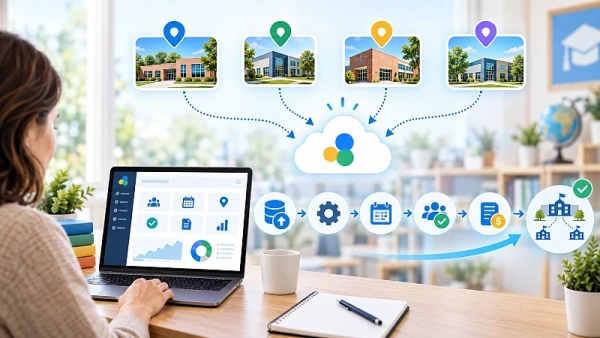
The pilot is ready to move forward when the data is correct, teachers can run lessons normally, billing can be verified, parents can access the information they need, and no critical issue requires repeated manual correction.
1. Map Your Current Setup Before You Migrate
Start by documenting how your organization works today.
List your:
- locations and rooms;
- services and classes;
- teachers;
- active students;
- lesson schedules;
- payment models;
- important administrative processes.
Also identify unusual cases.
A teacher may work at several locations. A student may attend more than one class. One branch may use a different payment arrangement.
Knowing this before you migrate makes multi-location class management easier to recreate correctly.
You should also decide which data really needs to move.
Your old system may contain years of records, but not all of them are required for daily work. Separate the information you need immediately from historical data that only needs to remain available for reference.
If your current system allows it, keep an export or accessible copy of important legacy records before the cutover.
2. Choose One Representative Branch as Your Pilot
Do not start by migrating every location.
Choose one branch that represents the way your organization normally operates.
The best pilot is usually not your smallest branch and not your most complicated one. Instead, choose a location that uses most of your normal workflows without exposing your largest customer group to the first migration.
A good pilot should include:
- typical classes and schedules;
- common payment arrangements;
- several active teachers;
- enough students to test daily operations;
- staff who can give useful feedback.
The goal is not to create a perfect demonstration. It is to test Clasero in a real working environment before the rest of your organization depends on it.
The pilot should do two things: prove that the setup works and create a process you can repeat.
3. Clean and Map Your Customer Data Before Importing It
Good student data migration starts before the import.
Clasero allows student profiles to be created manually and supports importing existing customer data from Excel or Google Sheets.
Before you import students from Excel, clean the source data.
Check for duplicate records, inactive customers, outdated contact details, inconsistent names, missing parent information, and incorrect class assignments.
Then map the information from your old system to the new setup.
For example:
- Student name → student profile
- Parent email → parent contact information
- Current class → class assignment
- Payment arrangement → relevant service and payment setup
The exact mapping depends on your existing data.
Do not try to migrate customer data for the whole branch immediately.
Start with a small sample. Open several imported records and check names, contact details, class assignments, and other important information.
If the imported values are wrong, fix the source data or field mapping. If the data is correct but students appear in the wrong class, service, or branch, review the Clasero configuration instead.
That distinction matters. It helps you solve the real problem instead of repeatedly correcting individual records.
4. Configure Clasero and Test Real Lessons
Once the pilot data is ready, configure the location in Clasero.
Set up the branch, premises or rooms, services, classes, teachers, payment options, and relevant company preferences. Clasero's Setup Mode provides a structured checklist for preparing the system for everyday use.
Then create the real lesson schedule.
Clasero's lesson planner allows lessons to be planned using information such as the branch, class, teacher, room, lesson time, and recurring schedule.
Now test it during actual lessons.
Teachers should be able to find their classes, see the correct students, and record attendance without needing constant help from an administrator.
Assign one person to own the migration internally. This person should maintain the rollout checklist, record issues, confirm that fixes have been tested, collect feedback from teachers, and decide whether the pilot is ready for the next stage.
That gives the migration a clear owner instead of leaving problems scattered between different people.
5. Test Billing and Choose a Clear Cutover Point
Billing should be tested separately from customer imports.
Clasero supports subscription and pay-as-you-go payment models. Test the payment arrangements your pilot customers actually use.
Take several real customer examples and compare the expected result with the result from the new Clasero workflow.
Where relevant, include customers with different payment arrangements or less common situations.
Do not move directly to large-scale invoicing until those examples have been checked.
You should also choose a clear cutover point.
Depending on your business, this may be the beginning of a new month, billing period, term, or course cycle.
From that point onward, everyone should know where current attendance, customer changes, and billing information are recorded.
Keeping the old system temporarily for historical reference can be useful. Maintaining two conflicting versions of current data is not.
6. Test Parent Access and Difficult Cases
Your employees are not the only people affected by the migration.
Through my.clasero.com, parents can access information such as lesson schedules, attendance, invoices, payment status, and relevant lesson information.
Introduce the portal to the pilot group first.
See which questions parents ask, then improve your instructions before introducing the system to other branches.
At the same time, test situations that are less straightforward.
For example:
- a student attending several classes;
- a teacher working across multiple locations;
- customers using different payment models;
- classes with unusual scheduling arrangements.
The purpose of the pilot is to find these issues early, not to prove that the easiest cases work.
7. Use a Go/No-Go Check Before Moving the Next Branch
Do not move the next location simply because the pilot has been running for a certain number of days.
Move forward when the important workflows have been verified.
Before approving the next branch, confirm that:
- customer records have been imported and checked;
- students appear in the correct classes;
- schedules are accurate;
- teachers can record attendance;
- required payment models have been tested;
- sample invoice calculations have been checked;
- parent access works as intended;
- unusual cases have been tested;
- critical issues have been resolved.
If billing cannot be reconciled, customer assignments are unreliable, or teachers still need frequent administrative help, pause the rollout.
Keep the next branch on the existing system until the problem is fixed.
Once the pilot is stable, save the final data-mapping rules, import steps, branch configuration, teacher instructions, billing checks, parent instructions, and approval checklist.
That becomes your rollout package for the next branch.
Move One Branch, Learn From It, Then Repeat
Moving a large education business to Clasero does not need to be one big-bang project.
Start with one representative location. Test real customer data, real teachers, real lessons, billing, and parent access. Fix what you discover while the number of affected users is still limited.
Then repeat the process using the rollout package created during the pilot.
That is the real value of a phased migration: test once, improve once, and then scale a proven process across the rest of your organization.
If you are planning to move from your current program to clasero.com, start by choosing the right pilot branch and building a migration process you can confidently reuse across every location.