
Clasero automatically calculates teachers' working hours and brings their daily records, completed lessons, and monthly totals together in one report. Instead of counting lessons and adding up hours in a spreadsheet, school administrators can review the figures and check that everything is correct.
This makes preparing a monthly teacher hours report much easier, especially for after-school programs with several teachers, different lesson lengths, and multiple locations.
Here's how to use Clasero's Teacher's Work Report to prepare a reliable monthly summary, identify discrepancies, and get the information ready for payroll or internal reporting.
Your Monthly Teaching-Hours Total Is Already Calculated
The biggest advantage of Clasero's Teacher's Work Report is that you don't need to calculate every teacher's hours yourself.
For the selected reporting period, the report shows:
- Total working hours for each teacher.
- Daily working hours and the number of lessons conducted.
- Details of completed and canceled lessons.
- Calculated earnings for individual lessons.
- A chart showing how working hours are distributed throughout the month.
Consider a teacher who conducts eight 60-minute lessons and four 90-minute lessons during a month.
That's 12 lessons totaling 14 hours of teaching.
Clasero provides the calculated working-hours total from the recorded lessons. The administrator can check the monthly figure and review individual dates if something looks unusual. There's no need to calculate every lesson's duration again.
This is particularly helpful when teachers have different schedules or conduct lessons of varying lengths.
How to Prepare Your Monthly Teacher Hours Report in Five Steps
Preparing a monthly report doesn't have to be complicated. The key is to review the totals first, then check the details where necessary.
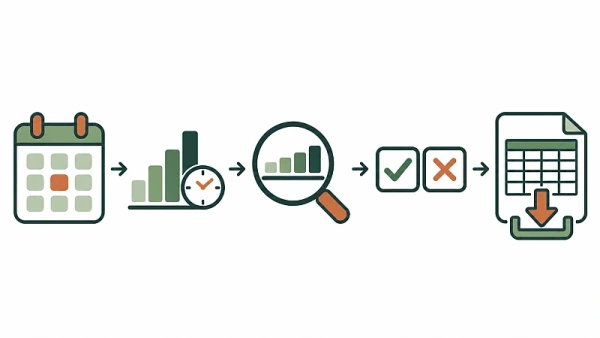
1. Select the reporting period
Open Clasero's Teacher's Work Report and select the month you want to review.
If your organization operates across several locations, you can start with the combined report for all branches.
2. Review each teacher's monthly totals
Check the total working hours and the number of lessons conducted.
These figures give you an overview of each teacher's recorded activity for the month. You can see the results without counting individual lessons or calculating their durations.
3. Examine daily working hours
If a monthly total looks different from what you expected, review the daily records.
For example, a teacher may have conducted additional lessons on certain days or taught fewer hours because some classes were canceled.
The daily breakdown helps you identify the dates that need checking.
4. Check completed and canceled lessons
Compare the recorded teaching activity with what actually happened during the month.
Remember that the original timetable may differ from the lessons actually conducted. Cancellations, additional sessions, and rescheduled lessons can affect the final teaching hours.
Checking these details helps ensure that the report reflects the work performed rather than simply the original schedule.
5. Export the report if necessary
Once you've checked the information, you can download the detailed teacher working-hours report in CSV format.
The exported data can be used for payroll preparation, bookkeeping, or internal reporting without manually copying each teacher's lesson records into another spreadsheet.
A quick review of completed and canceled lessons throughout the month can also prevent discrepancies from accumulating before the reporting deadline.
What to Check When Teacher Hours Look Wrong
Automatic calculations save time, but the underlying lesson records still need to be accurate.
Suppose a teacher normally conducts three lessons every Tuesday, but the monthly report shows fewer hours than expected.
Instead of recalculating the entire month, identify the dates with fewer recorded hours and compare them with the planned lessons.
Check whether:
- A scheduled lesson was canceled.
- An additional or rescheduled lesson is reflected correctly.
- A completed lesson is missing from the recorded activity.
- A lesson duration differs from what was expected.
For example, if a teacher's monthly total is lower than expected, a canceled lesson might explain the difference. If the total is unusually high, additional sessions or longer lessons may be responsible.
The important thing is to check the relevant dates and lesson details before drawing conclusions.
This makes teacher hours tracking more useful: administrators can investigate specific discrepancies instead of spending time recalculating an entire month's activity.
Review Teacher Hours Across Multiple Locations
Monthly reporting becomes more challenging when teachers work at different branches.
A music teacher might conduct lessons at one location on Mondays and another on Thursdays. A sports instructor might teach several groups across different facilities.
Clasero allows administrators to review teacher working hours across all branches or filter the report by a particular branch or class type.
This makes it easier to:
- Review monthly teaching hours across the organization.
- Check the teaching activity recorded at a specific location.
- Identify differences in workload between branches.
- Investigate unexpected figures without preparing separate calculations.
The report also includes a chart showing daily working hours, helping administrators recognize busy periods and understand how teaching activity is distributed throughout the month.
Using Teacher Hours for Payroll Preparation
A teacher working hours report is particularly useful when preparing information for payroll.
Clasero displays working hours as decimal numbers, rounded to one decimal place. For example, 1.5 hours means one hour and 30 minutes, not one hour and 50 minutes.
The Teacher's Work Report also includes calculated earnings for individual lessons, based on the payment arrangements configured for each teacher.
This is helpful when teachers receive different payments depending on the type of lesson they conduct.
However, it's important to distinguish between recorded teaching activity and a complete payroll calculation.
Depending on your organization's arrangements, payroll may also need to account for preparation time, meetings, paid leave, canceled lessons, or other compensated duties.
The report provides structured information about teaching hours and lesson-based earnings. Any additional payroll requirements should be checked separately.
Once the figures have been verified, the detailed CSV export can be used in external spreadsheets, payroll processes, or management reports. This gives administrators and bookkeepers a practical starting point without requiring a separate manual summary of every lesson.
Make Monthly Teacher Hours Reporting a Simpler Task
A monthly teacher hours report should help you verify teaching activity, not force you to calculate every lesson again.
Clasero brings daily records, lesson details, and automatically calculated totals together, making it easier to check the figures and prepare information for payroll.
If you're still using spreadsheets to add up teaching hours at the end of every month, explore Clasero's Teacher's Work Report. It could make this recurring administrative task considerably easier.


