
Your staff shouldn't have to answer the same scheduling question 20 times a week. And parents shouldn't have to arrive at a dance studio only to discover that their child's lesson has been cancelled.
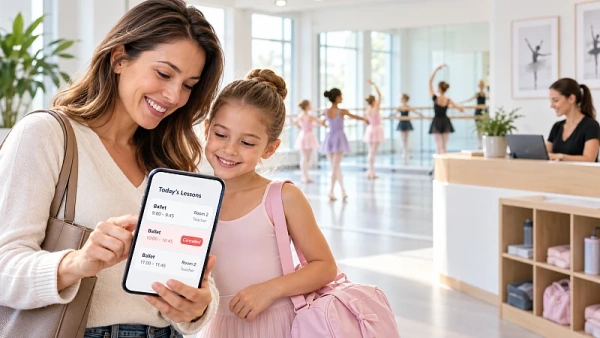
Clasero gives parents 24/7 access to lesson schedules, cancellations, locations, teachers, and class details through my.clasero.com. Instead of contacting your school, families can find the answers they need themselves.
Think of it as an online information desk that parents can use whenever they need to check a lesson.
Your team manages the schedule in Clasero. Parents check the information through their own portal. When families use it regularly, staff can spend less time answering routine questions and more time supporting students.
For busy dance schools and after-school programs, that can mean fewer interruptions and smoother daily operations.
Why Scheduling Questions Keep Coming Back
Imagine a parent arriving at your dance studio with their child, only to discover that today's lesson has been cancelled.
They didn't know about the change. Their earlier message went unanswered. Now they're frustrated and questioning whether they can rely on your school.
Even excellent teaching may not make up for poor communication.
Most parents simply want to know whether class is happening, where to go, who is teaching, and when to collect their child.
These questions seem small, but answering them repeatedly takes time.
Suppose your team receives 20 scheduling questions each week. At two minutes per reply, that's 40 minutes a week, or two hours and 40 minutes over four weeks.
This is an example, not a guaranteed saving. Still, it shows how much time routine questions can consume.
The solution isn't necessarily more staff. It's making accurate lesson information easy for parents to find.
How Parents Find Lesson Information Without Calling
Clasero connects your school's lesson planning with a dedicated parent self-service portal.
Administrators manage classes in Clasero, while parents sign in to my.clasero.com to see the lessons relevant to their children.
Here's how it works:
- Staff create the schedule. They select the class, teacher, location, room, and lesson time. Recurring lessons can be planned in advance.
- Parents open their calendar. They can check today's lessons or view upcoming classes in a weekly or monthly calendar.
- They check lesson details. Each lesson shows the location, room, start and end times, and assigned teacher.
- They check for cancellations. Cancelled lessons are visible, helping families confirm their plans before travelling.
- They share attendance information. Parents can leave a note if their child is sick or may arrive late.
Parents can also review past attendance. During an ongoing lesson, they can see how many minutes remain, making pickup planning easier.
Families with multiple children enrolled with the same provider can find their lesson information in one account.
And there's no extra app to install. The parent portal is mobile-friendly, so families can check their dance class schedule directly from their phones.
Prevent Questions Before Parents Ask
Some questions aren't about lesson times. Parents may need to know which entrance to use, where children should meet, or whether they need special equipment.
Teachers and administrators can add these instructions to a lesson's public notes in Clasero.
Parents can then find the information alongside the lesson details, without sending another message.
What Your School Should Do When a Lesson Changes
A dance school parent portal is only useful when schedules are accurate and families know where to look.
Start with a simple process whenever a lesson changes.
Update the lesson in Clasero as soon as the change is confirmed. Check the time, teacher, location, and room before finishing. At schools with several branches, assign someone responsible for updates at each location.
If a parent reports incorrect details, check the lesson, correct the mistake, and contact anyone affected.
Not Every Change Needs the Same Response
Consider a ballet class cancelled on Monday afternoon. The administrator updates Tuesday's lesson in Clasero. Parents who check their calendar can see that it has been cancelled.
But what if the cancellation happens just before class?
The less time parents have to react, the more important direct communication becomes. Update the calendar, but also contact affected families directly.
For broader announcements, Clasero's News Manager lets schools publish updates for all clients, one branch, or a specific class.
The calendar provides routine information. Direct contact remains important for urgent changes.
Make Sure Parents Actually Use the Portal
Having a portal doesn't automatically mean parents will use it.
During enrollment, show families how to find their child's next lesson on their own phone. Include my.clasero.com in your welcome information and encourage them to check it before travelling.
Clasero also lets administrators see whether parents are registered and actively using the portal.
This helps your team identify families who may need guidance getting started.
Instead of answering the same scheduling questions repeatedly, you can help those parents learn where to find the answers themselves.
Keep Multiple Locations and Teachers Organized
More classes, teachers, and locations mean more schedules to manage.
Your school might offer ballet at one studio, hip-hop at another, and private lessons with different instructors.
Each family needs the right information for their own class.
Clasero's dance school scheduling software helps administrators organize lessons by branch, room, teacher, and time. Teacher availability settings can also warn staff about scheduling conflicts.
Before a new timetable begins, check four essentials: the teacher, lesson times, location and room, and any public notes parents need.
Checking these details early helps prevent mistakes.
The same approach works for music schools, sports clubs, and other providers managing after-school class schedules across several locations.
Find Out Why Parents Are Still Asking Questions
A parent self-service portal can reduce routine inquiries, but how do you know whether it's helping?
Start by counting scheduling questions during two typical weeks. Repeat the count after introducing parents to the portal.
Compare similar weeks. If enrollment changes, consider measuring questions per 100 families rather than comparing raw totals.
But don't just count questions. Look at what parents are asking.
If families repeatedly ask about rooms, check whether locations are clear. If cancellation questions continue, review how quickly updates are entered and how urgent changes are communicated.
If parents still ask when their next lesson starts, check whether they know how to use the portal.
The goal isn't less communication. It's fewer unnecessary questions and more time for families who need personal help.
With Clasero, parents have one place to check schedules, teachers, locations, and cancellations. Your staff can focus on teaching and supporting students instead of repeatedly explaining the timetable.
Explore Clasero to see how parent self-service could make everyday class management easier for your school.


