
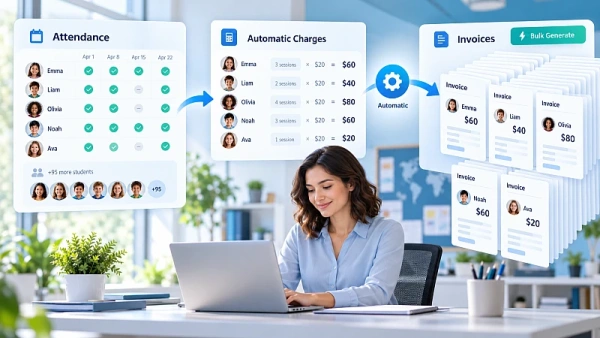
Clasero automatically calculates each student's pay-as-you-go charges from recorded lesson attendance. Administrators can then generate individually calculated invoices in bulk with just a few clicks.
Imagine managing 100 students at a dance school, music academy, or tutoring center. Some attend four lessons, others eight, and several pay different prices per class.
Do you really want to calculate 100 different bills every month?
With Clasero, automated student invoicing makes monthly billing easier. Teachers record attendance, the system calculates the charges, and administrators generate the invoices together.
Think of it as having a digital secretary for your monthly billing.
Why Monthly Student Billing Takes So Much Time
The hardest part of student invoicing isn't creating the invoice. It's calculating exactly how much each student owes.
For after-school programs, attendance can change every week.
One student attends every lesson. Another misses two classes. Someone reschedules a session, while another pays a different rate.
With pay-per-lesson invoicing, each student may need a different calculation.
Without a dedicated system, administrators often need to:
- Collect attendance records from teachers.
- Check spreadsheets against lesson schedules.
- Calculate individual student charges.
- Prepare invoices with different amounts.
- Track payments and outstanding balances.
Even ten students can create unexpected paperwork. With 100 or 200 students, those calculations can take hours every month.
That's why after-school billing software becomes especially useful as a school grows.
How Clasero Turns Attendance Into Individual Invoices
Clasero combines student attendance tracking with automatic payment calculations and bulk invoicing.
Instead of manually calculating what every student owes, administrators can use the attendance information already recorded by teachers.
Here's how the process works.
1. Set up classes and payment options
First, configure your classes, services, and payment arrangements in Clasero.
You can set prices per visit for pay-as-you-go students and assign the appropriate payment options.
Existing student information can also be imported from Excel or Google Sheets, reducing manual data entry.
2. Teachers record actual attendance
For each lesson, teachers mark which students attended directly in Clasero.
Each recorded visit is linked to the relevant lesson, student, and payment arrangement.
Administrators no longer need to collect separate attendance spreadsheets from every teacher to calculate monthly charges.
3. Clasero calculates individual charges
For pay-as-you-go students, Clasero calculates the amount owed using recorded visits and the applicable rates.
A student attending three lessons may owe less than someone attending eight. Students can also have different prices per visit.
With attendance-based invoicing, the system performs these calculations instead of leaving them to the administrator.
If a student's payment arrangement changes, the new arrangement applies to future classes without changing charges for previous lessons.
4. Generate individual invoices in bulk
When it's time for monthly billing, the administrator initiates invoice generation for eligible pay-as-you-go visits from the previous period.
Clasero uses the calculated amounts to prepare the individual invoices together.
Students with no eligible visits during that period are not included in its pay-as-you-go invoicing.
The result is a simpler process for preparing many invoices, even when every student owes a different amount.
What Does This Look Like With 100 Students?
Imagine a music school where students attend different numbers of lessons and pay different rates.
Here's a simple example:
StudentLessons attendedPrice per lessonAmount owedEmma5€15€75Oliver8€15€120Sophia3€20€60
Illustrative example using hypothetical lesson prices.
Emma and Oliver pay the same price per lesson but attend different numbers of classes. Sophia has fewer lessons and a different rate.
With spreadsheets, someone must check each student's attendance, apply the correct price, calculate the amount, and prepare an invoice.
For three students, that's manageable. For 100 students with different attendance records and payment arrangements, it becomes repetitive work.
Clasero calculates those individual charges from recorded visits and configured rates. The administrator can then generate the invoices together.
That's the difference between simply creating invoices and calculating individual student bills before generating them in bulk.
Three Things to Check Before Generating Invoices
Automated calculations depend on accurate attendance and payment information.
Before preparing monthly invoices, it's worth checking three things:
- Attendance records: Make sure teachers have recorded attendance for the billing period.
- Payment arrangements: Confirm students have the correct prices and payment options assigned.
- Lesson records: Review the relevant attendance information, especially when lessons have been rescheduled.
These are recommended administrative checks, not automatic validation steps.
Once the records are up to date, Clasero can calculate the eligible pay-as-you-go charges using the information already in the system.
This makes monthly student billing easier to manage without repeatedly checking separate spreadsheets.
How Much Time Can Automated Invoicing Save?
Clasero's documentation describes a dance school teacher managing approximately 200 students.
Previously, preparing monthly invoices took more than four hours because each student's attendance had to be considered individually.
According to Clasero, the teacher now saves at least four hours each month using the system.
This is a company-reported example, not a guaranteed result. Actual savings depend on student numbers, payment arrangements, and existing billing processes.
Still, it shows why bulk invoice generation can be valuable when every student needs an individually calculated bill.
What if Students Have Different Payment Plans?
Some families prefer a fixed subscription, while others pay according to attendance.
Clasero supports both payment models within one system.
For subscriptions, administrators can configure prices, durations, and optional limits on included visits. Subscription invoices can be generated individually or in bulk through a separate process.
For pay-as-you-go students, charges are calculated using recorded attendance and configured rates.
This flexibility helps schools manage different payment arrangements without maintaining separate billing spreadsheets.
Keep Billing Organized Across Teachers and Locations
Managing several teachers or locations makes collecting attendance information more complicated.
Clasero keeps lesson schedules and attendance records organized in one place.
Teachers record attendance for their classes, while administrators can review class attendance reports across the organization or for specific branches and classes.
This gives school owners and program coordinators a clearer overview without collecting separate records from every teacher.
Multi-branch availability depends on the selected Clasero plan.
Make Student Invoices Clearer for Parents
When families pay per lesson, they may want to know which classes are included in their bill.
Clasero lets administrators include detailed attendance records on invoices, making individual charges easier to understand.
Through the Clasero parent portal, families can view their children's lesson schedules, attendance records, invoices, and payment statuses.
Administrators can also monitor unpaid invoices and outstanding balances.
For easier payment tracking, Clasero supports importing bank transaction CSV files and matching payments to invoices after configuration, provided the bank offers a compatible export.
These features help schools keep payment information organized and answer parents' billing questions.
Spend Less Time Calculating Bills and More Time Teaching
Calculating different bills for dozens or hundreds of students shouldn't consume your evenings.

Clasero connects recorded lesson attendance with automatic pay-as-you-go calculations and bulk invoice generation, helping reduce repetitive administration.
Whether you're an independent teacher or managing a growing after-school program, a simpler billing process can leave more time for teaching.
Explore Clasero to see how automated attendance-based billing could make your monthly invoicing easier.


