Online Invoice Payments for Schools: Why Are You Still Linking Payments to Invoices Manually?
A parent pays an invoice. The money reaches your bank account. But someone still has to check the payment, identify the customer, find the correct invoice, and change its status to Paid.
For schools, academies, tutors, and businesses running after-school classes, that repeated process can become a significant administrative burden.
Clasero helps shorten it.
With supported online invoice payments for schools, a customer can pay an unpaid invoice directly through my.clasero.com. After a successful integrated payment, the payment is linked to the corresponding invoice and Clasero automatically marks that invoice as Paid.
That is the key difference.
Online payment makes paying easier for the customer. Automatic payment reconciliation removes work for the business.
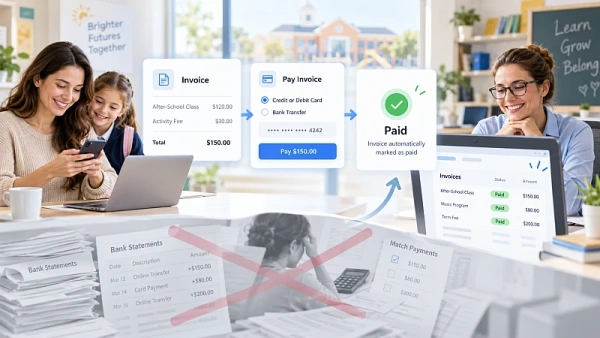
The real payment problem often starts after the money arrives
Sending an invoice is only one part of school payment processing.
The less visible workload begins when the customer pays.
With a traditional bank transfer, an administrator may need to:
- check incoming bank transactions;
- identify the parent or customer;
- determine which invoice the payment belongs to;
- verify the amount;
- find the invoice in the administration system;
- update its payment status.
This is payment reconciliation for schools.
Each individual payment may take only a few actions. The problem is that those actions are repeated across many invoices.
Accepting a payment online solves only part of the problem. The bigger operational benefit comes when the system also knows which invoice has been paid and updates its status automatically.
From an unpaid invoice to Paid automatically
Clasero connects the online payment process directly with the invoice.
When the supported EveryPay integration is enabled, customers can see a Pay button next to unpaid invoices in my.clasero.com.
The customer selects Pay, chooses from the supported banks, and completes the payment.
After a successful payment, the funds are credited to the organization’s bank account and Clasero automatically marks the corresponding invoice as Paid.
No separate manual invoice-status update is required.
Compare the two workflows:
Traditional bank-transfer workflow
Invoice issued → customer transfers money → administrator checks the bank → identifies the payer → finds the invoice → confirms the payment → changes the invoice status.
Integrated Clasero workflow
Invoice available in Clasero → customer selects Pay → customer completes payment → the successful payment is linked to the corresponding invoice → Clasero marks the invoice Paid.
This automated invoice matching is the main administrative benefit. A successful payment can close the invoice instead of creating another task for staff.
Why automatic invoice reconciliation matters
An invoice can be paid in the bank while still appearing unpaid in an administration system.
That happens when receiving money and updating the invoice are separate processes.
It can lead to unnecessary work. Staff may check the bank again, another administrator may see outdated information, or a customer may be contacted about an invoice that has already been paid.
With automatic invoice reconciliation, a successful integrated payment updates the corresponding invoice in Clasero.
For those payments, staff can use the updated invoice status in Clasero instead of checking the bank first and then changing the record manually.
This is where school billing automation becomes useful: it reduces the number of routine actions required after each successful payment.
A more connected billing workflow
Education providers often manage attendance, payment models, invoices, and incoming payments as part of the same operational process.
Clasero supports both subscription-based and pay-as-you-go payment models.
For pay-as-you-go services, recorded attendance can be used to calculate what a student needs to pay, and invoices can be generated for eligible visits. Subscription invoices can also be created individually or in bulk.
Invoice payment automation extends that workflow beyond invoice creation.
Where supported, the process can continue from invoice generation to customer payment and then to an automatically updated invoice status.
That helps reduce the need to treat invoicing and payment reconciliation as separate administrative tasks.
Parents can see invoices and payment status
Parents using my.clasero.com can view their latest invoices, see the payment status of each invoice, and check whether an outstanding balance exists.
When online payments are enabled, they can also initiate payment from an unpaid invoice.
For businesses offering online payments for after-school programs, this creates a clearer path from invoice to payment for both the customer and the administrator.
What if a parent pays by regular bank transfer?
Not every payment has to use the integrated online payment flow.
The automatic Paid status described above applies to successful payments completed through the supported EveryPay integration.
If customers use another payment method, Clasero provides additional options for recording and reconciling those payments.
Where a bank provides a suitable CSV transaction export, the business can configure Clasero to import the file and synchronize incoming payments with issued invoices. After the initial mapping is configured, the saved setup can be reused for future imports.
Payments can also be recorded manually, including the actual date on which payment was received.
This means an organization can combine online invoice payments with existing payment methods rather than requiring every customer to follow the same process.
What is required to enable online invoice payments?
Clasero’s current specification documents an integration with EveryPay by Swedbank in Latvia, Lithuania, and Estonia.
The organization first needs an appropriate EveryPay agreement with Swedbank covering payments through Clasero. The integration then needs to be configured with the required EveryPay credentials and callback settings.
Once activation and configuration are complete, customers can pay unpaid invoices through my.clasero.com using the supported payment flow.
The day-to-day result is straightforward: after a successful integrated payment, Clasero automatically marks the corresponding invoice as Paid.
Online invoice payments: common questions
Can Clasero automatically mark an invoice as paid?
Yes. After a successful payment through the supported EveryPay integration, Clasero automatically marks the corresponding invoice as Paid. No separate manual invoice-status update is required for that payment.
Does Clasero automatically reconcile every bank transfer?
No. The fully automated workflow applies to successful payments made through the supported online integration. Other payments can be handled through supported bank CSV synchronization or recorded manually.
Where can parents see and pay invoices?
Parents can view invoices through my.clasero.com. The portal shows invoice payment status and outstanding balances. When the supported online payment integration is enabled, customers can initiate payment from an unpaid invoice.
A payment should close the invoice, not create another task
Schools and education businesses already manage students, teachers, schedules, attendance, communication, and finances.
Checking the bank, identifying a payment, matching it to an invoice, and manually updating the invoice adds another repetitive process.
With school invoicing software that connects invoices, payments, and payment status, the workflow becomes much more direct:
Customer pays → the successful payment is linked to the corresponding invoice → Clasero marks the invoice Paid.
For successful integrated payments, that means less manual reconciliation and a clearer payment workflow for both the education provider and the customer.
If matching payments is becoming a regular administrative task in your school, academy, tutoring business, or after-school program, explore how Clasero can bring more of that payment process into one connected workflow.